
Get StartedCR MEMBERS
Our digital offerings are built to fit your life—flexible, accessible, and designed with clarity in mind. Whether you're diving into a course, exploring exclusive content, or joining a membership, everything is structured to be easy to use and truly useful.
The CR SoftStack Prompt Builder (powered by the CHARLIE Method) helps busy adults turn real-life situations into clear, calm, copy-and-paste prompts for AI tools. (ChatGPT, Notion, CoPilot, etc.)
Turn “I don’t know what to say” into structured prompts in 60 seconds
Beginner-friendly, but smart enough for power users
Built for real life: work, money, routines, boundaries, and soft life goals
Free to use. No login required.
Try the CR SoftStack Prompt Builder
CR SoftStack Prompt Builder
Tell me what you want a prompt for, and I’ll turn it into a clean, copy/paste prompt you can use in your AI tool.
- Soft life & mindset: Help me design a weekly routine that feels calm but still productive.
- Digital productivity: Help me organize my tasks into a simple system I can actually follow.
- Work & communication: Help me write a clear, kind message to set a boundary with someone.
- Clarity & reflection: Help me reflect on my current habits so I can feel less overwhelmed.
Your text stays in your browser. We don’t store or send your input anywhere.
How to Use It
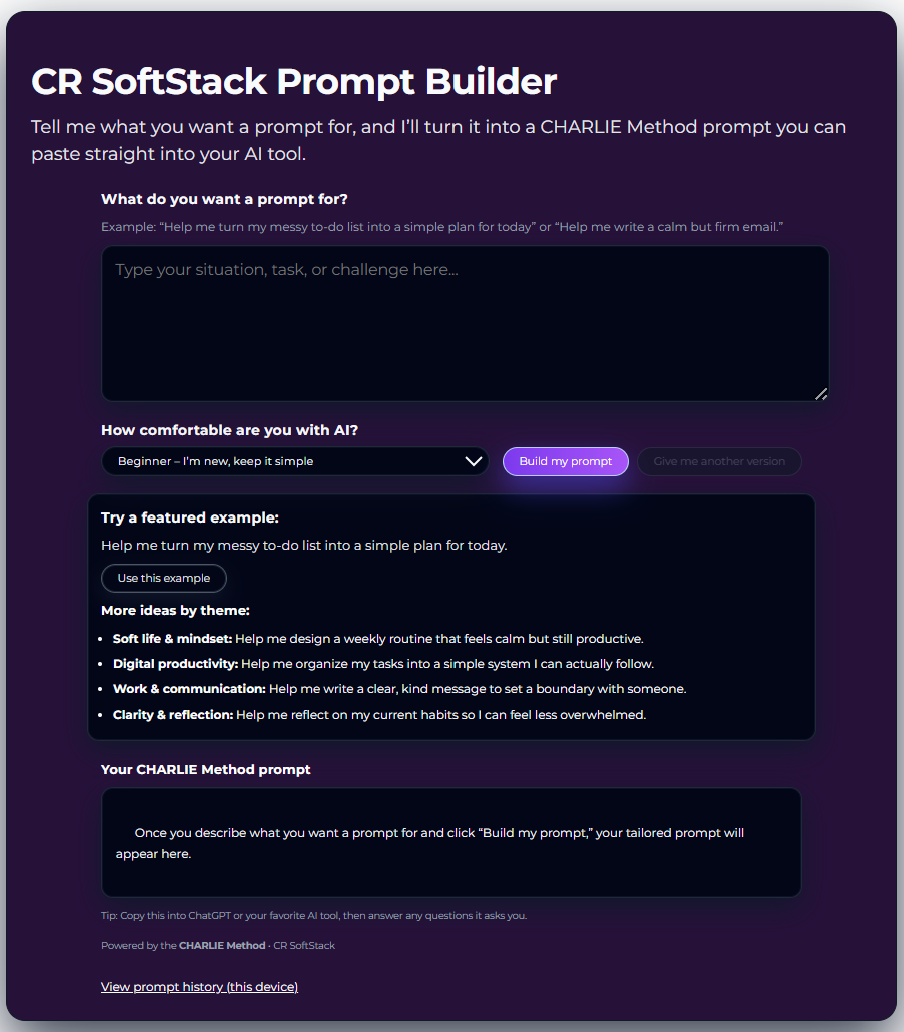
Step 1 – Describe your situation
Short sentence about:
Type what you want a prompt for. Messy is okay.
Step 2 – Choose your comfort level
Beginner, Intermediate, or Expert, so the prompt meets you where you are.
How it works (in under 60 seconds)
3 Simple Steps)
1
2

3
Step 3 – Click “Build my prompt”
View your prompt in the Your CHARLIE Method prompt section
Copy the CHARLIE Method prompt into your AI tool and follow the questions it asks you.
You can also click “Give me another version” to see a second take.
Want to view your previous prompts? Click the “View prompt history(this device)” link at the bottom of the page
Access Anytime, Anywhere
All digital content is available on your schedule—no deadlines, no pressure.



Upcoming
January 15
New York, NY
We break things down into simple, manageable parts so you never feel overwhelmed. As you progress, you’ll develop both skill and self-assurance, one step at a time.
February 15
New York, NY
Through thoughtful examples and guided exploration, you'll learn to approach obstacles with fresh eyes. This course is about unlocking flexibility, not following formulas.
March 15
New York, NY
Each lesson is designed to equip you with useful strategies you can immediately put into action. It’s about learning with purpose and seeing real results.